

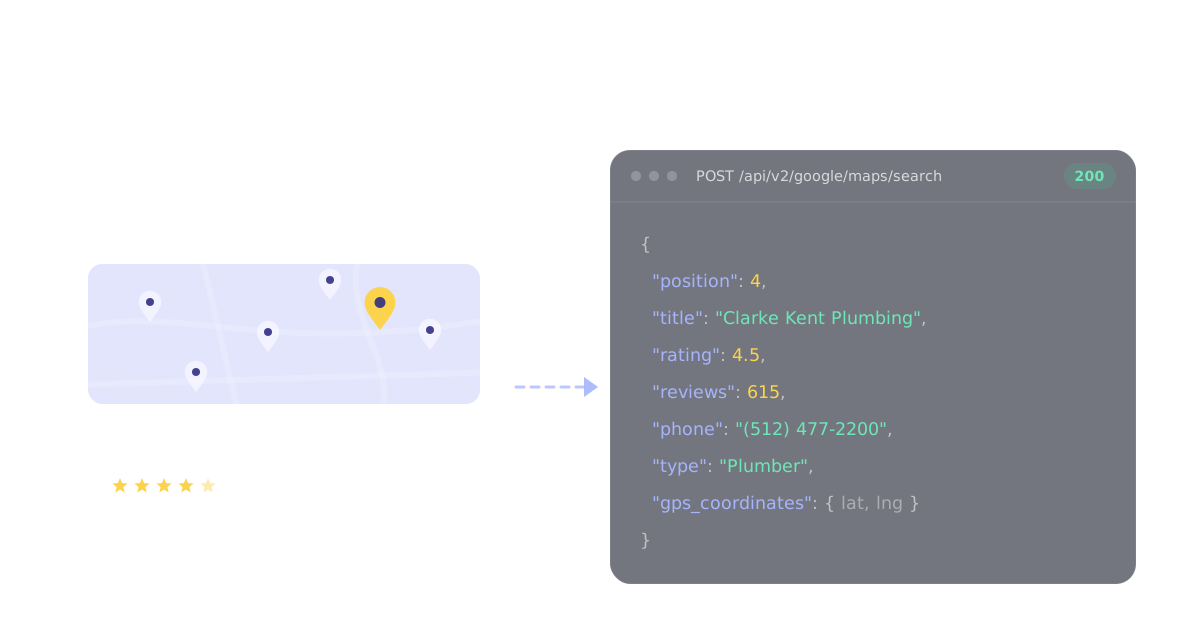
For a Google Maps lead list built in code, start with Scavio's Google Maps API: one POST /api/v2/google/maps/search call returns 20 businesses with phone, website, hours, rating and coordinates for 1 credit. Scavio starts from $2 per 1,000 requests on the Growth plan billed yearly, and a Maps search is a 1-credit request, so 1,000 searches (20,000 businesses) cost $2. Choose Outscraper for no-code exports with email enrichment, Apify's Google Maps Scraper for large pay-per-place runs with add-ons, Bright Data for bulk record delivery, PhantomBuster for a CSV inside a sales workflow, Google's Places API when you only display results and never keep them, and gosom/google-maps-scraper if you want it free and will run it yourself.
We build Scavio, so read that recommendation with the bias in mind. To keep it honest: every price below was read off the vendor's own page on October 7, 2026, every Scavio response in this post is a real capture from that day, and the Scavio section lists what it does badly, including two problems we found while writing this. Scavio is the cheapest paid option per business found, about $0.10 per 1,000 businesses on the Growth plan billed yearly, but it does not find emails, and at small volumes Bright Data, Outscraper and Google's own free tiers cost less, while gosom's open-source scraper is free outright.
Which Google Maps scraper fits your job?
Most Google Maps scraping is lead generation: a category, a city, and a spreadsheet of businesses to call or email. Two questions decide the tool: do you need emails, and are you allowed to keep what you collect?
| Tool | Choose it for | Emails? | Price (checked Oct 7, 2026) | Main thing to check |
|---|---|---|---|---|
| Scavio | Lead lists and reviews inside an app, script or agent | No | Starts from $2 per 1,000 requests on Growth billed yearly; a search is 1 credit for 20 businesses, about $0.10 per 1,000 businesses; $0.01 a credit pay as you go | 120 results per query, no email |
| Outscraper | No-code exports with enrichment | Yes, paid enrichment | First 500 businesses free, then $3 per 1,000 | Enrichments priced separately |
| Apify (compass/crawler-google-places) | Large runs with optional add-ons | Yes, $2 per 1,000 add-on | $4 per 1,000 places on the free plan, $1.50 on Business | Add-ons stack per place |
| Bright Data | Bulk record delivery to storage | Not from Maps listings | $1.50 per 1,000 records; 5,000 free a month | Setup is built for data teams |
| PhantomBuster | A CSV inside a sales automation | Via separate email credits | From $56 a month billed annually | Trial exports capped at 10 rows |
| Google Places API (New) | Displaying places in your own app | No | $35 per 1,000 Text Search Enterprise requests; 1,000 free a month | You may not store most of it |
| gosom/google-maps-scraper | Free, self-hosted crawling | Yes, by crawling websites | Free, MIT licensed | You run it and bring proxies |
If you are comparing hosted Google Maps APIs on price and response shape rather than lead-list tools, our Google Maps data API comparison covers that side.
The decision that matters most: can you keep the list?
A lead list is only useful if you can store it, de-duplicate it and hand it to a CRM. That is exactly where the official route and the scrapers part ways.
Google's Places API (New) is the sanctioned way to get Maps data, and per request it is not expensive. A Text Search that asks for phone, website, rating or hours triggers the Enterprise SKU, which costs $35 per 1,000 requests up to 100,000, with 1,000 free requests a month. Each request returns up to 20 places, so 1,000 businesses is about 50 requests, or $1.75.
The catch is the terms. Google's Places API policies let you store place IDs indefinitely and say you must not pre-fetch, cache or store other Places content beyond the allowed exceptions, and results must carry Google's attribution. A spreadsheet of phone numbers and websites that lives in your CRM for six months is the thing those terms rule out. Text Search also stops at 60 results per query, and Place Details returns at most five reviews.
Scrapers read the public listing instead, which is how they return 120 results per search and as many reviews as a place has. They also run outside Google's own Terms of Service, which prohibit automated access that ignores robots.txt and similar instructions. Business names, phone numbers and addresses are the low-risk end of that trade. Reviewer names and the emails some tools add are personal data, so store only what the campaign needs.
Where the emails come from
The single most common claim on this keyword is "Google Maps scraper with emails". Google Maps listings do not show email addresses. Every tool that returns them visits the business website listed on Maps and looks for an address there, the same way gosom's README describes its -email option: optional crawling of business websites.
That has two consequences. First, an email column can only be as full as the website column, and our test below found 91% of plumbers had one. Second, you can do it yourself: fetch the website from your Maps results and parse the contact page, or pay the per-place enrichment add-on in Outscraper, Apify or PhantomBuster.
What a Google Maps lead list actually contains
To see what a lead-gen buyer actually gets, we ran one realistic job: "plumbers in Austin, TX", centered on downtown Austin, through every page Scavio's Maps search allows (start 0 to 100, six pages, six credits). That returned 120 rows and 115 unique businesses after removing duplicates by place_id. Then we counted which fields came back.
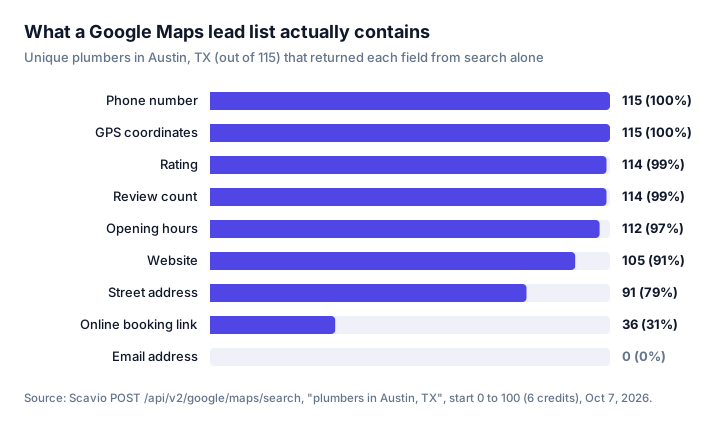
Phone numbers and coordinates came back on every business, ratings and hours on nearly all. The gaps are worth planning around:
- 24 of 115 had no street address. Plumbers are service-area businesses, and many hide their address on Maps. Pulling place detail for one of them, Austin Plumbery, returned a phone, website, rating and coordinates but still no address. No scraper can return what the listing does not show.
- 10 of 115 had no website, which also means no email for anyone who enriches from websites.
- 5 businesses appeared twice across page boundaries, so de-duplicate on
place_idbefore you count leads. - Six pages is the ceiling. A seventh request with
start: 120was rejected with a400. To go past 120 results, split the area into several map centers and merge.
Swap plumbers for dentists and the picture is cleaner: the first page of "dentists in Austin, TX" came back with an address, phone and website on all 20. Dental offices see patients on site; plumbers come to you.
1. Scavio for lead lists inside your app or agent
Scavio is a REST API, so it fits when Google Maps data feeds code: a lead pipeline, an n8n workflow, an agent that finds local businesses. The Google Maps endpoints and their real credit costs:
| Endpoint | Returns | Credits | Per 1,000 requests on Growth billed yearly |
|---|---|---|---|
/api/v2/google/maps/search | Up to 20 places per page with phone, website, hours, rating, coordinates | 1 | $2 |
/api/v2/google/maps/place | One place in full, with rating breakdown, images and review highlights | 1 | $2 |
/api/v2/google/maps/reviews | A page of up to 20 reviews, sortable | 1 | $2 |
/api/v2/google/maps/geo-grid | A business's local rank at every point of a 3x3, 5x5 or 7x7 grid | 1 per grid point | $2 per 1,000 grid points |
A full search for one category and city is a short loop:
import os
import requests

leads = {}
for start in range(0, 120, 20):
    r = requests.post(
        "https://api.scavio.dev/api/v2/google/maps/search",
        headers={"Authorization": f"Bearer {os.environ['SCAVIO_API_KEY']}"},
        json={"query": "plumbers in Austin, TX", "ll": "@30.2672,-97.7431,12z", "start": start},
        timeout=90,
    )
    for place in r.json().get("local_results", []):
        leads[place["place_id"]] = place

print(len(leads))
Each item in local_results looks like this, trimmed to the fields a lead list keeps:
{
  "position": 4,
  "title": "Clarke Kent Plumbing",
  "place_id": "ChIJt5Drbcq0RIYRIYj8euPKCTU",
  "data_id": "0x8644b4ca6deb90b7:0x3509cae37afc8821",
  "gps_coordinates": { "latitude": 30.228482999999997, "longitude": -97.78124059999999 },
  "rating": 4.5,
  "reviews": 615,
  "type": "Plumber",
  "address": "1408 W Ben White Blvd, Austin, TX 78704",
  "hours": "Open 24 hours",
  "phone": "(512) 477-2200",
  "website": "https://www.clarkekentplumbing.com/?utm_source=gmb&utm_medium=organic&utm_campaign=website",
  "service_options": { "language_assistance": true, "online_estimates": true, "onsite_services": true }
}
Pass the data_id to the reviews endpoint for reputation work. Two things we confirmed on real captures: sort_by: "newest" orders by last edit, so a review first posted in August 2024 and edited two hours before our request came back as the fourth newest, with iso_date showing the original date and iso_date_of_last_edit the edit. If you need recency, read iso_date_of_last_edit. And for finding recent complaints, lowest_rating beat newest: on a business with 674 one-star reviews, its first page was five 1-star reviews posted between June 30 and September 1, 2026, while the newest page held one.
For local SEO rather than lead lists, the geo-grid endpoint checks where one business ranks across a grid of map points, billed per point that returns data. We did not run it for this post.
What Scavio does badly, from the same day's testing:
- No emails. Maps search returns the website, not an inbox. You add the website crawl yourself.
- 120 results per query. Search pages hold 20 and
startstops at 100. Larger areas need several map centers, and overlapping pages produced 5 duplicates in 120 rows. - Review paging is unreliable on very large listings. On a business with 17,992 reviews, three requests asking for 10 or 20 reviews each returned 5, with no
next_page_tokento continue. A dentist with 734 reviews returned the full 20 and a token. That is our bug to fix; until it is fixed, check for the token before assuming you have every review. - It is not instant. The six search pages took a median of 6.7 seconds and the slowest 20.8. One
lowest_ratingreviews request took 64 seconds. Set a generous timeout. - The lowest rate needs a commitment. $0.002 a credit is the Growth plan billed yearly, $4,788 up front. Pay as you go costs $0.01 a credit, five times as much, and the smallest purchase is 2,500 credits.
What it buys is one key and one JSON format across Google Maps, Google Search and the rest of what Scavio covers, with an MCP server for agents. For the Outscraper side of that choice in more depth, see Google Maps leads: API vs Outscraper and scaling Google Maps without Outscraper.
2. Outscraper for no-code exports with enrichment
Outscraper's Google Maps Scraper ranked first or second on both queries we checked, and it is the default for marketers who want a file rather than an API. You enter categories and locations in a web app and download CSV, Excel, Parquet or JSON, with enrichments that add emails and social profiles from business websites. It also has an API.
Pricing is free for the first 500 businesses, $3 per 1,000 from 501 to 100,000, and $1 per 1,000 after that. Enrichments are billed on top. One caveat on sourcing: Outscraper's pages showed us a bot check on October 7, so these tiers are as Outscraper's own pricing and product pages appeared in Google's index that day.
3. Apify for large runs with add-ons
The Google Maps Scraper Actor by Compass is the most-used option on Apify, with 638,000 total users and a 4.7 rating from 1,817 reviews on its page, and it is maintained by Apify. Its page says it can go past Google's limit of about 120 places per search when you give it a geographic area rather than a single search term.
Its pricing is per event. A scraped place costs $4 per 1,000 on the free plan, $3 on Starter ($19 a month), $2 on Scale ($199 a month) and $1.50 on Business ($999 a month). Add-ons stack: company contacts enrichment is $2 per 1,000 on the free and Starter plans, reviews and images $0.50 per 1,000 each, and business leads enrichment $5 per 1,000 on Starter. A list with contacts on Starter is therefore $5 per 1,000 places, before reviews.
4. Bright Data for bulk record delivery
Bright Data's Google Maps Scraper API has collectors for business information, reviews and images, and delivers JSON, NDJSON or CSV through the API or straight to S3, Google Cloud Storage, Azure, Snowflake or SFTP. Pay as you go is $1.50 per 1,000 records, billed for successful records only, with 5,000 free records a month and no card required; the Scale plan is $499 a month for 384,000 records.
Choose it when the job is "drop a large file into our warehouse every week". Its Maps collectors return listing data, so plan a separate step for emails.
5. PhantomBuster for a CSV inside a sales workflow
PhantomBuster's Google Maps Search Export turns a Maps search into a CSV or Google Sheet, and chains into its other automations for enrichment and outreach. Its own page notes that Google Maps shows around 120 results per search, the same ceiling we hit.
Plans start at $56 a month billed annually for 20 hours of execution time, and the 14-day trial limits exports to 10 rows. Pricing is by execution time rather than per place, so the cost per lead depends on how long your searches run. Pick it if your team already runs outbound in PhantomBuster.
6. Google Places API (New) for displaying places, not keeping them
If your product shows nearby businesses on a map or in a search box, use the official Places API. It is stable, documented, and inside Google's terms by definition. The price list is set by the fields you request: Text Search Pro is $32 per 1,000 requests, Enterprise (phone, website, rating, hours) $35, and Place Details runs from $5 per 1,000 for Essentials to $25 for Enterprise plus Atmosphere, which is where reviews live.
For lead lists it fails on the terms, not the price: you can keep place IDs, not the phone numbers and websites. It also caps Text Search at 60 results and reviews at five per place. We explain the cost side in more depth in why the Google Maps API gets expensive.
7. gosom/google-maps-scraper for free, self-hosted crawling
gosom/google-maps-scraper ranked third for "google maps scraper" and was the open-source pick in Google's own AI Overview for that query. It has 6,314 GitHub stars, an MIT license, and its latest release, v1.18.1, shipped on September 20, 2026. It runs as a CLI, web UI or REST API in Docker, and its README claims about 120 places a minute and optional email extraction from business websites.
It is free in money and expensive in time. Larger crawls need proxies, which you source and pay for, and when Google changes its page, your job breaks until a new release lands. Use it to learn or for occasional pulls.
What to check before buying volume
- Whether you can store the output. Official API data comes with storage limits; scraped data comes with Google's terms and privacy law. Decide which risk you are taking before you pick on price.
- The unit you are billed for. Per place, per request, per record, per hour of runtime, per enrichment. Normalize to cost per 1,000 usable leads, after duplicates.
- Field coverage on your own category. Run one real search and count the fields, as we did above. Service-area businesses hide addresses; storefronts do not.
- Where the emails come from. If a tool returns emails, it crawled the website. Check how often your category even lists a website.
- The 120-result ceiling. Every tool that reads Google Maps search hits it. Ask how the tool splits an area, or plan to do it yourself.
- Pagination and failure behaviour. Confirm you get a cursor when there is more data and that failed calls are not billed. Our own review paging failed this check on one very large listing, and we only caught it because we looked.
Frequently asked questions
Does Google Maps allow scraping? Not explicitly. Google's Terms of Service prohibit using automated means to access its services in violation of the machine-readable instructions on its pages, such as robots.txt, and the official Places API only lets you store place IDs indefinitely. Every scraper in this post reads public listings outside those terms, so the question to settle is what you store and how you use it, not whether a tool can technically fetch the page.
What is the best free Google Maps scraper? For unlimited free use, gosom/google-maps-scraper on GitHub: MIT licensed, actively maintained, and able to crawl business websites for emails, but you run it and supply your own proxies at volume. For free hosted tiers, Bright Data includes 5,000 records a month, Outscraper's first 500 businesses are free, and Scavio gives 50 free credits, which is 1,000 businesses at 20 per search page.
Is Apify Google Maps scraper legal? Apify's Google Maps Scraper collects publicly visible listing data, and using it is not illegal by default, but it runs outside Google's terms and you are responsible for what you collect. Business names, phones and addresses are low risk; reviewer names and emails are personal data under laws such as GDPR, so store only what you need. This is not legal advice.
Is there a tool that can scrape addresses from Google Maps? Every tool here returns the address when the listing shows one, but many service businesses hide theirs. In our test of 115 Austin plumbers through Scavio's Maps search, 91 (79%) had a street address, while all 115 had a phone number and GPS coordinates. No tool can return an address Google does not display.
Skip the scraper maintenance
If you build this yourself, you own the parts this post kept running into: splitting every city into enough map centers to get past 120 results, de-duplicating businesses that repeat across pages, handling the service-area listings with no address, walking review cursors that sometimes do not appear, and re-testing every time Google changes the Maps page.
Scavio absorbs the fetching and the parsing. You send a query and a map center and get the same JSON shape every time, with nothing to host. Scavio starts from $2 per 1,000 requests on the Growth plan billed yearly ($399 a month for 200,000 credits). Search, place detail and reviews are 1 credit each, so $2 per 1,000 requests, and the geo-grid is 1 credit per grid point. A search page holds 20 businesses, so a list of 1,000 businesses costs about 50 credits: about $0.10 on Growth billed yearly, or $0.50 at the pay-as-you-go rate of $0.01 a credit (2,500-credit minimum purchase) if you want to start without a commitment. Adding a 20-review page for each of those 1,000 businesses is another 1,000 credits: $2 on Growth billed yearly, $10 pay as you go.
Get an API key with 50 free credits, no card required, and run one real search for your own category and city before you decide.