

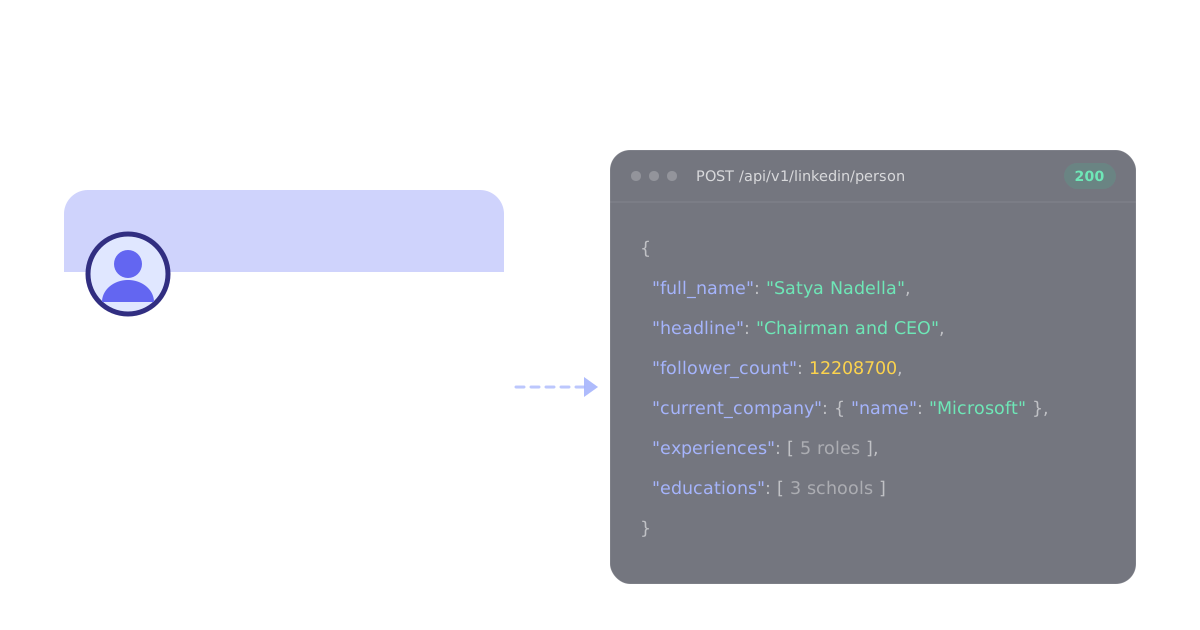
For a LinkedIn scraper inside an app, a pipeline or an AI agent, start with Scavio's LinkedIn API: POST /api/v1/linkedin/person returns a public profile as JSON for 1 credit, without your LinkedIn login. Scavio starts from $2 per 1,000 requests on the Growth plan billed yearly, and a profile is a 1-credit request, so 1,000 profiles cost $2. Choose Bright Data for bulk record delivery, Apify for pay-per-result runs over a list of URLs, PhantomBuster or Evaboot for no-code lead lists, and joeyism/linkedin_scraper only for small scripts on your own account.
We build Scavio, so that recommendation comes with an obvious bias. To keep it honest: every price below was read off the vendor's own page on October 7, 2026, every Scavio response in this post is a real capture from that day, and the section on Scavio includes the things it does badly.
Which LinkedIn scraper fits your job?
Start with the one question that decides most of the risk: does the tool log in to LinkedIn as you? Then match the output to where the data has to go.
| Tool | Choose it for | Uses your LinkedIn login? | Price (checked Oct 7, 2026) | Main thing to check |
|---|---|---|---|---|
| Scavio | Profiles, Post Reactions, Job Search, Email, People Search, and companies and posts inside an app or agent | No | Starts from $2 per 1,000 requests on Growth billed yearly; a profile or company is 1 credit, so $2 per 1,000; $0.01 a credit pay as you go | No follower or connection scrap |
| Bright Data | Bulk record delivery and datasets | No | $1.50 per 1,000 records; 5,000 free records a month | Billing per record, delivery setup |
| Apify (HarvestAPI) | Pay-per-result runs over a list of profile URLs | No | $4 per 1,000 profiles, $10 with email search | Third-party actor, maintained by its author |
| PhantomBuster | No-code profile scraping into Sheets or HubSpot | Yes, your LinkedIn cookie | From $56 a month billed annually | Activity limits on your own profile |
| Evaboot | Sales Navigator lists with verified emails | Yes, your Sales Navigator session | $29 a month for 400 credits | Needs a Sales Navigator seat |
| joeyism/linkedin_scraper | Free Python scripts | Yes, a saved login session | Free, open source | Your account carries all the risk |
Whose login a scraper uses is the decision that matters
LinkedIn treats two kinds of scraping very differently. One reads the public, logged-out version of a profile, the page anyone sees from a search engine. The other signs in, as you or as a fleet of accounts, and reads what members see.
The second kind is where the damage happens. Proxycurl, for years the default answer to "LinkedIn profile API", was sued by LinkedIn in January 2025 over accounts it had created to scrape behind the login wall. It shut down on July 4, 2025, and the case ended with an order to delete the scraped data. Closer to home, tools that run on your own session cookie inherit LinkedIn's activity limits on your profile; push them too hard and it is your account that gets restricted.
So read the "Uses your LinkedIn login?" column first. A "yes" is not automatically wrong, since Sales Navigator exports only exist behind a login, but it means you are spending your own account's standing on every run.
What a logged-out profile actually returns
The trade for not logging in is that you get the public profile, not the member view. To see what that means in practice, we pulled 10 public profiles of founders, CEOs and authors through Scavio and counted which fields came back.
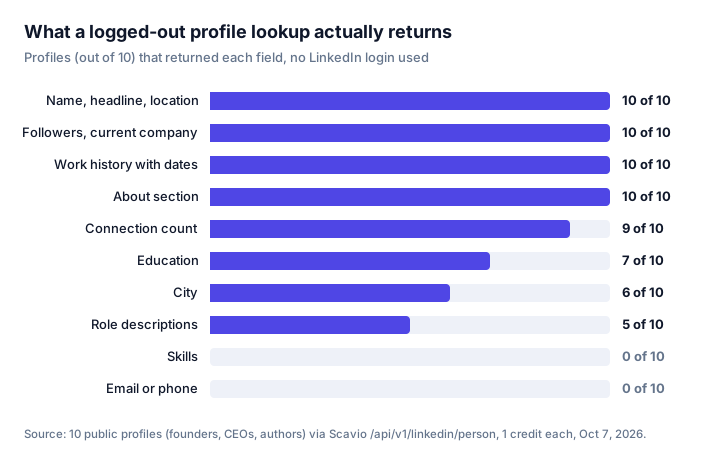
The core of a profile is reliable: identity, headline, follower count, current company and a dated work history came back on every one. The gaps are worth planning around. Education was missing on 3 of 10 (Jeff Weiner's, Simon Sinek's and Gary Vaynerchuk's public pages do not show it), a city on 4, and only half the profiles carried descriptions on their roles. Skills never appear on the logged-out page, and neither do emails or phone numbers.
That last point applies to every tool that does not log in. If you need contact details, you need an enrichment step such as Apify's email search mode or Evaboot, not a better scraper.
1. Scavio for profiles and companies inside your app
Scavio is a REST API, so it fits when LinkedIn data feeds code: a CRM enrichment job, a research agent, an n8n workflow. It reads public data and never asks for your LinkedIn login.
The LinkedIn endpoints and their real credit costs:
| Endpoint | Returns | Credits | Per 1,000 requests on Growth billed yearly |
|---|---|---|---|
/api/v1/linkedin/person | Public profile with work history and education | 1 | $2 |
/api/v1/linkedin/company | Company page, headcount, locations, recent posts | 1 | $2 |
/api/v1/linkedin/post | One post with its engagement counts | 1 | $2 |
/api/v1/linkedin/person/posts | A page of a member's posts, comments or reactions | 10 | $20 |
/api/v1/linkedin/company/posts | A page of a company's posts | 10 | $20 |
/api/v1/linkedin/post/comments | A page of comments on a post | 10 | $20 |
/api/v1/linkedin/search/jobs | A page of job listings for a keyword | 10 | $20 |
/api/v1/linkedin/job | One job posting in full | 30 | $60 |
A profile lookup is one request:
import os
import requests

r = requests.post(
    "https://api.scavio.dev/api/v1/linkedin/person",
    headers={"Authorization": f"Bearer {os.environ['SCAVIO_API_KEY']}"},
    json={"username": "satyanadella"},
    timeout=90,
)
profile = r.json()["data"]
print(profile["full_name"], profile["follower_count"])
And the response, trimmed to the fields most pipelines keep:
{
  "full_name": "Satya Nadella",
  "headline": "Chairman and CEO at Microsoft",
  "location": "Redmond, Washington, United States",
  "follower_count": 12208700,
  "current_company": { "name": "Microsoft", "company_id": "microsoft", "title": "Chairman and CEO" },
  "experiences": [
    { "title": "Chairman and CEO", "company": "Microsoft", "start_date": "Feb 2014", "end_date": "Present" },
    { "title": "Board Member", "company": "Starbucks", "start_date": "2017", "end_date": "2024" }
  ],
  "educations": [
    { "school": "The University of Chicago Booth School of Business", "start_year": "1994", "end_year": "1996" }
  ]
}
The company endpoint is similarly dense. Our HubSpot capture returned the employee count (12,967), 1,762,693 followers, all 14 office addresses, specialties, similar companies and the last 10 company posts with their like and comment counts, for 1 credit.
What Scavio does badly, from the same day's testing:
- emails, people search. People search and email address details are available, email if mined from the internet using the profile info
- Job search filters by country, not by city.
location: "Austin, TX"searches the whole United States; filter on each job'slocationfield if you need one metro.
What the difference buys is one key and one response format across LinkedIn and everything else Scavio covers: Google, Amazon, TikTok, Instagram, YouTube, Reddit and more, plus an MCP server as well as Skills for agents.
2. Bright Data for bulk records
Bright Data's LinkedIn Scraper API covers people profiles, companies, job listings and posts, and adds a people-search collector that Scavio does not have. Pay-as-you-go pricing is $1.50 per 1,000 records, with 5,000 free records a month and no card required. Output arrives as JSON, NDJSON or CSV, through the API, a webhook or straight into S3, Google Cloud Storage, Azure or Snowflake.
Choose it when the job is "deliver a large file of records" rather than "answer a request in the middle of my app". Check what counts as a record for the collector you pick before you size the bill.
3. Apify for pay-per-result runs
Apify is a marketplace of scrapers called Actors, and LinkedIn has dozens. A widely used no-login option is HarvestAPI's LinkedIn Profile Scraper: $4 per 1,000 profiles, or $10 per 1,000 with an email search step, with 77,649 users and a 4.63 rating on its page. You hand it a list of profile URLs and collect a dataset when the run finishes.
The catch is ownership. Each Actor is maintained by its author, not by Apify, so pin the exact Actor you tested and re-check it when LinkedIn changes something.
5. PhantomBuster for no-code lead lists
PhantomBuster's LinkedIn Profile Scraper pushes profile data into Google Sheets or HubSpot without code. Its own page lists your LinkedIn cookie as an input: the automation runs as you. Plans start at $56 a month billed annually, and the free trial caps exports at 10 rows.
It is a good fit for a sales team that lives in a CRM and runs modest volumes. Respect the daily limits it recommends, because the account at risk is yours.
6. Evaboot for Sales Navigator exports
Evaboot turns Sales Navigator searches into clean lead lists with found and verified emails. Pricing starts at $29 a month for 400 credits, falling to $0.033 a credit on the $99 plan. It needs a Sales Navigator seat, and it works through that logged-in account.
If your list starts as a Sales Navigator search and ends in an outbound sequence, this is the shortest path. It is not a general-purpose profile API.
7. joeyism/linkedin_scraper for free scripts
joeyism/linkedin_scraper, the most popular open-source option with 4,569 GitHub stars and last updated in April 2026, is a Python library built on Playwright that pulls people, companies and jobs. It is free, and its README is explicit that LinkedIn requires authentication: you create a session file by logging in.
Use it to learn, or for a few dozen profiles of your own network. Run it at volume and your account absorbs the consequences.
Check the official LinkedIn API first
LinkedIn does have official APIs, and if one covers your case it is the safest route. In practice, Sign In with LinkedIn returns basic profile data only for the member who consents, and the marketing, sales and talent APIs sit behind partner programs that require an application and approval. None of them offer general lookup of arbitrary public profiles, which is why the tools above exist.
What to check before buying volume
- Which login it uses. Logged-out public data, your session, or someone else's accounts. This decides your risk more than price does.
- The unit you are billed for. Per record, per request, per credit, per hour of runtime. Normalize to cost per 1,000 profiles before comparing.
- Field coverage on your own list. Run 10 profiles that look like your real targets and count the fields, as we did above. Public figures fill their profiles more completely than the average account.
- Failure behaviour. Whether failed calls are billed, and how the tool reports a profile that no longer exists.
- Filters you depend on. Test any location or date filter twice before you build on it. While researching this post, our own job search turned out to be ignoring the location and returning worldwide results; we fixed it the same day, and only caught it because we checked.
Frequently asked questions
Is scraping LinkedIn allowed? LinkedIn's User Agreement prohibits scraping, so any scraper runs against LinkedIn's terms. What changes the risk is how the data is collected: tools that log in with your account put that account at risk, while services that read public, logged-out pages do not involve your profile at all.
Will LinkedIn ban you for scraping? It can, if the scraper runs on your account. Browser extensions and cloud automations that use your session cookie are subject to LinkedIn's activity limits and can get the profile restricted. An API such as Scavio's reads public profiles without your login, so there is no account of yours for LinkedIn to restrict.
Is it legal to scrape LinkedIn profiles? It depends on what you collect and how, and this is not legal advice. US courts have treated scraping public pages differently from access behind a login: in hiQ v. LinkedIn, earlier rulings said public scraping likely is not unauthorized access under the CFAA, but hiQ was still found to have breached LinkedIn's User Agreement. Personal data laws such as GDPR apply to what you store either way.
Is there a free LinkedIn scraper? Yes, with limits. joeyism/linkedin_scraper is free and open source but runs on your own logged-in account. Bright Data includes 5,000 free records a month, and Scavio gives 50 free credits, which is 50 profile or company lookups.
Skip the scraper maintenance
If you build this yourself, you own the parts this post kept running into: logged-in sessions that LinkedIn keeps restricting, a parser for profiles that group several roles under one employer (Jeff Weiner's and Sundar Pichai's both do, with the company name in the title field), retries for transient failures, and a re-test every time the public page changes.
Scavio absorbs that. You send a username or URL and get the same JSON shape every time, with no LinkedIn account involved and nothing to maintain. Scavio starts from $2 per 1,000 requests on the Growth plan billed yearly ($399 a month for 200,000 credits). A profile or company is 1 credit, so $2 per 1,000; a page of posts or jobs is 10 credits, so $20 per 1,000; a full job posting is 30 credits, so $60 per 1,000. To start without a commitment, pay as you go at $0.01 a credit (2,500-credit minimum purchase), so enriching 2,000 CRM contacts uses $20 of credits.
Get an API key with 50 free credits, no card required, and call the profile endpoint on your own list before you decide.
Reference: LinkedIn person endpoint docs and the LinkedIn API overview.