
Definition
TikTok's sec_uid is an opaque internal string identifier for a user account, required by most profile, video, and follower API endpoints, distinct from the numeric user_id.
How to get a TikTok secUid in your browser, without code
Every public TikTok profile ships its own secUid inside the HTML that builds the page. Reading it takes no account, no extension and no code — just the view-source and find features already in your browser. The screenshots below are a real capture of TikTok's own profile, start to finish.
Open the profile like normal
Go to tiktok.com/@handle in any browser. You do not need to be logged in and you do not need to follow the account — the value you are after is already in the page that just loaded.
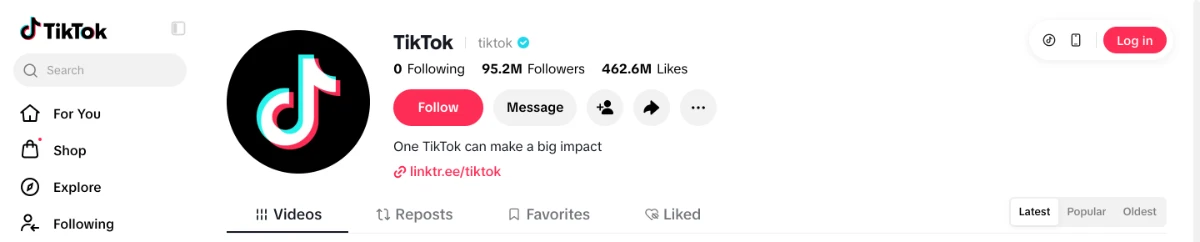
The profile as it loads for a logged-out visitor. Nothing on screen shows the secUid — it is in the source underneath. Open the page source
Press the view-source shortcut, or right-click an empty part of the page and choose View page source. A tab opens with the raw HTML TikTok actually sent: about 22 lines, because nearly the whole page is packed onto one of them.Cmd + Uon Mac,Ctrl + Uon Windows
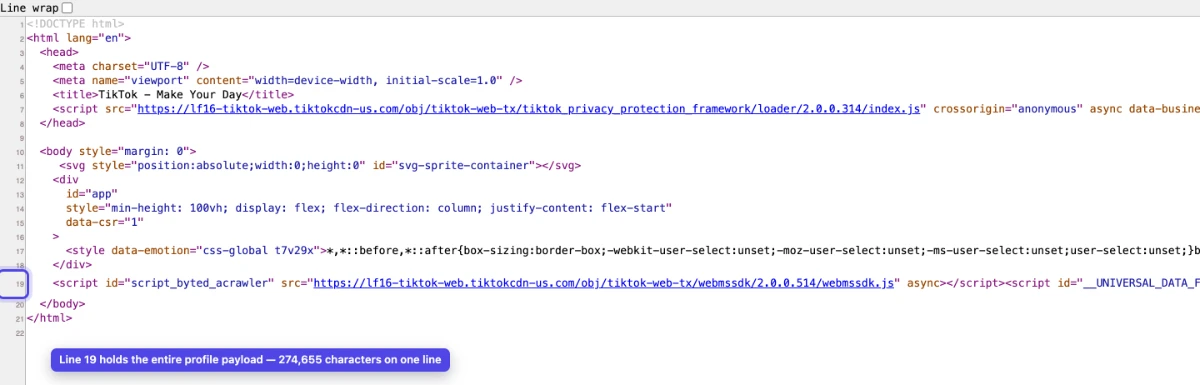
Line 19 carries roughly a quarter of a million characters. Every piece of profile data, including the secUid, is inside it. Turn on Line wrap, then search for secUid
Tick the Line wrap box in the top-left corner first. Without it that one line runs about two million pixels off to the right, and the browser scrolls sideways to reach the match instead of showing it to you. Then open the find bar and type secUid. A profile page contains exactly one.Cmd + Fon Mac,Ctrl + Fon Windows
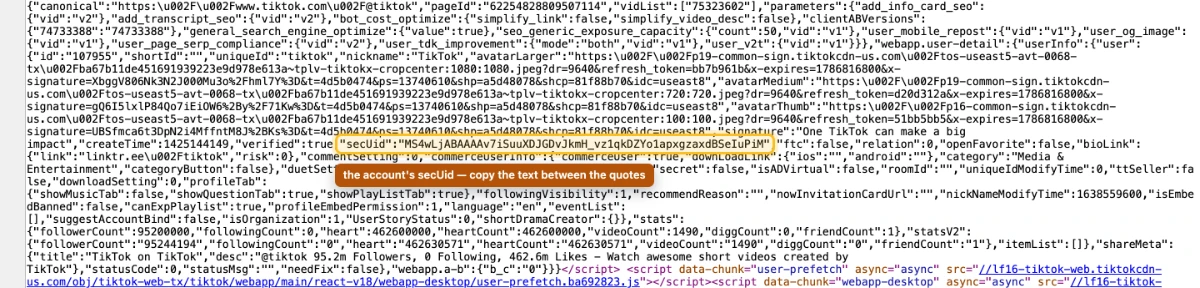
One match, sitting in the userInfo block alongside the nickname, follower count and avatar URLs. Copy the value between the quotes
The secUid is the string after the colon. It starts with MS4wLjABAAAA and is usually 76 characters long. Copy what is inside the quotes and nothing else — no quotes, no comma, no trailing space. That string is what the posts, followers and followings endpoints ask for.

TikTok's own account, captured for this guide. Its secUid is 55 characters — a legacy account. Most are 76.
When it does not work
- The find bar says there are no results
- You are searching the rendered page rather than its source. secUid never appears in visible text, so the find has to run in the view-source tab — check the address bar starts with view-source:.
- You got a login wall or a robot check
- Then the HTML you are reading is the challenge page, not the profile, and it carries no userInfo block at all. Load the profile normally in a fresh tab first, confirm the avatar and follower count are visible, and only then open the source.
- You copied the number sitting next to it
- Immediately before the secUid you will see an id field holding a plain number — 107955 on the account above. That is the numeric user id, a different identifier. Endpoints that want a sec_uid reject it.
- You need this for a list of accounts
- Four steps per account is fine for one or two. For a list, or for anything that has to re-run on a schedule, the lookup below does the same thing in one paste and returns both identifiers at once.
Or skip the four steps
The free TikTok secUid Finder does exactly what the walkthrough above does, in one paste: give it a handle or a profile link and it returns the secUid and the numeric user id, with a copy button and a ready-to-run API request. No login, first three lookups free.
Get a secUid freeIn Depth
The sec_uid looks like MS4wLjABAAAA... — a base64-style string that usually runs 76 characters (a few older accounts, TikTok's own among them, are shorter). It does not change when a user changes their username, which is what makes it the stable identifier for long-term tracking. The endpoints that return a user's posts, followers, and followings all key on it; a bare username or the short numeric uid is not accepted there.
A sec_uid cannot be derived or guessed from a handle — it only exists in TikTok's own data for that account. You can read it by hand out of the profile page source, as the walkthrough above shows, or have a profile lookup return it. If you just need the value once, paste the handle into the free TikTok secUid Finder and copy it. In code it is one call:
import requests

API = "https://api.scavio.dev/api/v1/tiktok"
HEADERS = {"Authorization": "Bearer YOUR_API_KEY"}

# Step 1: resolve the handle (1 credit)
profile = requests.post(
    f"{API}/profile",
    headers=HEADERS,
    json={"username": "target_creator"},
).json()

sec_uid = profile["data"]["user"]["sec_uid"]
print(sec_uid)  # MS4wLjABAAAA...

# Step 2: use it wherever sec_user_id is required
posts = requests.post(
    f"{API}/user/posts",
    headers=HEADERS,
    json={"sec_user_id": sec_uid, "count": 20},
).json()
Watch the naming, because the same value has three spellings. TikTok's web API returns it as secUid in camelCase; the app API returns it as sec_uid, which is what Scavio's profile response carries; and the endpoints that consume it take it as sec_user_id in the request body. There is no lowercase secuid anywhere in the API — that spelling only exists in search boxes. The profile endpoint accepts either username or sec_user_id, so once the string is cached you never need the handle again.
Cache the sec_uid per account. It rarely changes and the profile call costs 1 credit — re-fetching it before every request is the most common source of unnecessary credit spend in TikTok integrations.
Example Usage
A creator analytics pipeline caches sec_uid for 500 tracked creators in SQLite, refreshing weekly. This reduces profile lookup calls from 3,500/week to 500/week, saving 3,000 credits ($15/week) at Scavio rates.
Platforms
TikTok sec_uid is relevant across the following platforms, all accessible through Scavio's unified API:
- tiktok