
Definition
Check the profile page first, then take any commit they authored, add .patch to the URL, and read the From: header — that is where a GitHub user's email actually lives. Scavio's GitHub User Email API runs every one of those checks in a single request and flags the no-reply addresses that will never deliver.
How to find any GitHub user's email address
Four checks, in the order worth doing them. The first two are the obvious places and usually come back empty. The third is the method that actually works. The fourth is the method almost every older guide still recommends — which stopped working without an error or an announcement.
Check the profile page first
Open
github.com/HANDLEand read the details list under the bio, beside the company and location rows. If the account holder has set a public email it renders there as a mailto link, and you are done in five seconds. Most accounts have not set one, so expect the list to hold only company and location.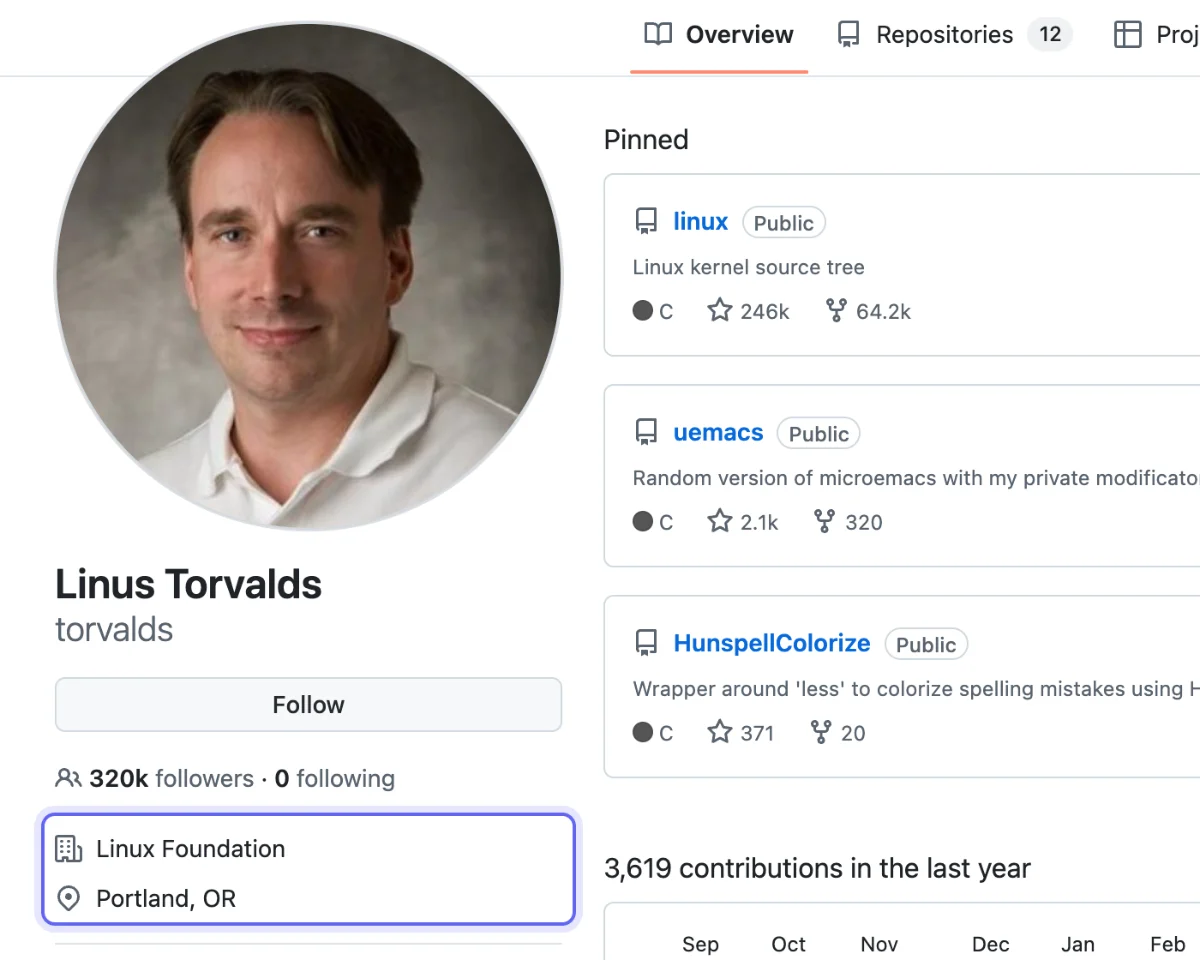
The details list is where a public email appears. On this account it holds only company and location — the ordinary case, and the reason the rest of this guide exists. Check the same field through the API
The programmatic version of step 1 is
https://api.github.com/users/HANDLE, whoseemailfield carries whatever the profile shows. No token, no login. Unauthenticated requests to this endpoint are capped at 60 an hour. Expectnull— it was null for torvalds, gaearon, sindresorhus and tj on 1 September 2026.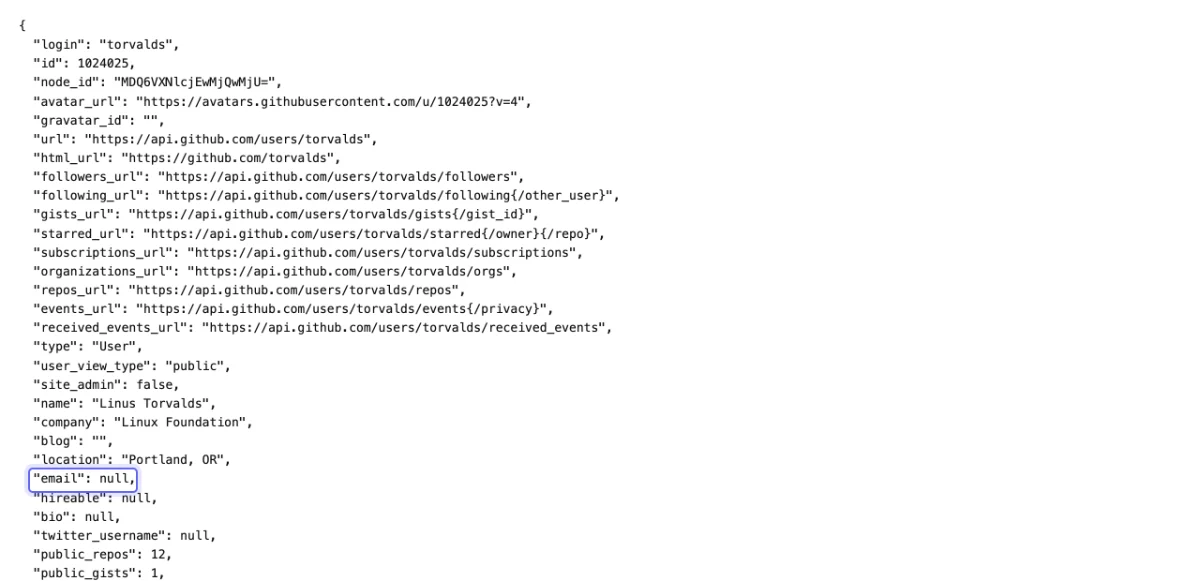
The documented emailfield, null — as it is for the large majority of accounts. The address you want is not on the profile at all.Add .patch to any commit they authored
This is the method that works. Find one commit by that person and append
.patchto the commit URL:https://github.com/OWNER/REPO/commit/SHA.patch. GitHub serves the raw patch, and its second line is aFrom:header carrying the name and email git recorded when the commit was made.
The From:header on a real commit. This walkthrough uses a renovate[bot] commit on purpose — the mechanism is identical for a person, and a bot's address is nobody's personal data.Skip the events API — the commits array is gone
Older guides tell you to read
payload.commits[].author.emailfromhttps://api.github.com/users/HANDLE/events/public. GitHub removed that array. Checked on 1 September 2026 across 154 PushEvents from three active accounts, no payload contained acommitskey — it ends atbefore. Code written against the old shape returns zero addresses instead of raising, so the breakage is silent.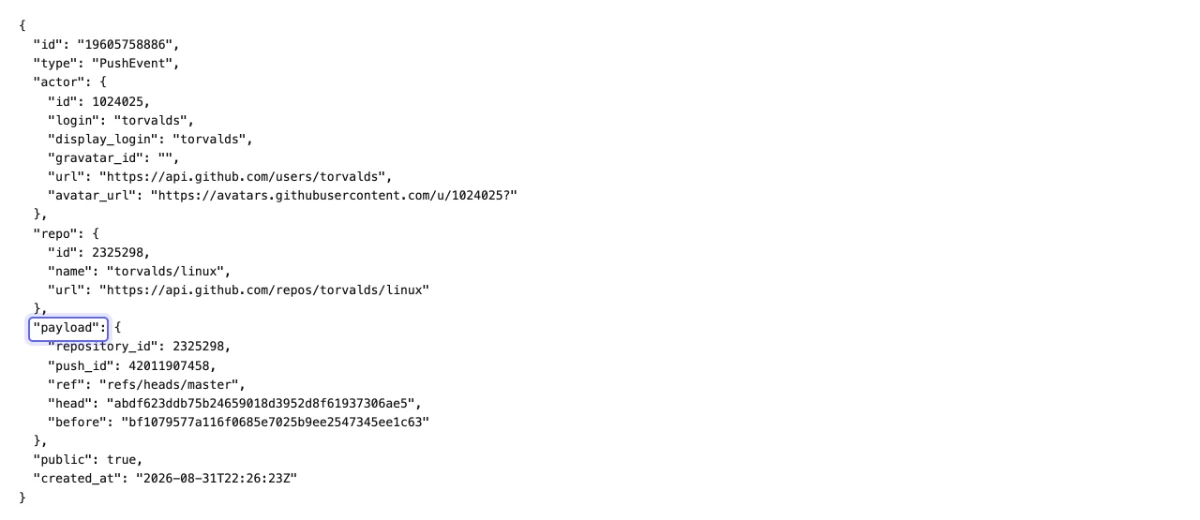
One PushEvent, in full. The payload block closes after before. There is no commits array to read an email out of any more.
When it does not work
- The address ends in users.noreply.github.com
- Then the account has "Keep my email addresses private" turned on, or the commit was authored through GitHub's web editor. It is a real git identity in the form
{id}+{login}@users.noreply.github.com, but mail sent to it does not deliver. Test for the suffix — a pipeline that skips that check reports a high match rate and a dead list. - The commit search returns a repo the person never worked on
- Commit search matches the commit's
authorfield, and forks and mirrors carry the original author metadata. Readrepository.full_nameon each hit and confirm it is a repository they actually contribute to before you trust the address. - Everything works, then stops after a handful of lookups
- You have hit the search rate limit, which is much tighter than the rest of the API: 10 requests per minute unauthenticated and 30 with a token, against 60 an hour and 5,000 an hour for core endpoints. Add a token first, then back off between handles.
- The handle has no commits in any public repository
- There is nothing to find. The commit author email only exists where a public commit exists, so accounts that only open issues, review, or star repositories return no address by any method — including this one.
Or resolve a handle in one call
The GitHub User Email endpoint runs the commit search, falls back to .patch files, checks the profile field, deduplicates, and flags every @users.noreply.github.com address so primary_email is only ever deliverable. 2 credits a lookup, and you can run one against a real handle on the page before signing up.
Try the email finderIn Depth
Check the profile first, because when it is there it takes five seconds and nothing else is needed. Open github.com/{handle} and look at the details list under the bio, next to the company and location rows: if the account holder has set a public email, it renders there as a mailto link. A minority of accounts do. GET /users/{handle} returns the same value as the email field, which is the programmatic version of that same check — and on 1 September 2026 it came back null for torvalds, gaearon, sindresorhus and tj, four of the most public developers on the platform. Do the check, expect nothing, and move on.
What that check misses is that a GitHub account has two different email addresses attached to it. The profile email is the optional one above, which almost nobody sets. The commit author email is the address configured as user.email in whatever git client made the commit. That one is baked into every commit the account has ever pushed, it is served publicly, and it is what people actually mean when they ask how to find a GitHub user's email address.
The manual route takes one request. Open any commit the person authored and append .patch to the URL: https://github.com/{owner}/{repo}/commit/{sha}.patch. GitHub serves the raw mbox patch, and the second line is a From: header carrying the name and address git recorded at commit time. No token, no login, no scraping — the walkthrough above is the whole method.
Do not use the events API for this, whatever an older tutorial tells you. The standard advice for years was to call /users/{handle}/events/public and read payload.commits[].author.email. GitHub has removed that array. Across 154 PushEvents pulled from three active accounts on 1 September 2026, not a single payload contained a commits key — the object now stops at repository_id, push_id, ref, head and before, exactly as the fourth screenshot shows. Code written against that shape does not error; it silently finds zero emails, which is a far worse failure than a 404. If an enrichment job of yours quietly stopped returning GitHub addresses, this is very likely why.
To do it at scale, search commits by author instead. GET /search/commits?q=author:{handle} returns commit objects with commit.author.email inline, so one request covers a handle rather than one request per commit:
curl -s "https://api.github.com/search/commits?q=author:torvalds&per_page=5" \
  | jq -r '.items[].commit.author.email' | sort -u
Two things bite here. The search API is rate limited far harder than the rest of GitHub — 10 requests per minute unauthenticated, 30 per minute with a token, against 60 per hour and 5,000 per hour respectively for core endpoints — so a list of a few hundred handles will spend most of its wall clock sleeping. And commit search matches on the commit author field, which means results can surface from forks and mirrors of a repository the person never touched directly. Read repository.full_name on each hit before you treat the address as confirmed.
Then there is the noreply case. If the account has "Keep my email addresses private" enabled, or the commit was made through the GitHub web editor, the address you get back is a @users.noreply.github.com one, in the modern {id}+{login}@users.noreply.github.com form or the older {login}@users.noreply.github.com. That is a real, routable-looking string and it is genuinely the account's git identity, but it will not deliver mail. Any pipeline that does not test for the users.noreply.github.com suffix will report a healthy match rate and a dead send list.
Scavio's GitHub User Email endpoint does all four checks in one call for 2 credits. It runs the commit search, falls back to fetching .patch files when a hit has no inline address, reads the profile field too, deduplicates, and flags every noreply so primary_email is only ever a deliverable address:
import requests

r = requests.post(
    "https://api.scavio.dev/api/v1/github/user/email",
    headers={"Authorization": "Bearer YOUR_API_KEY"},
    json={"handle": "torvalds"},   # username, @handle or a github.com/<user> URL
).json()

print(r["data"]["primary_email"])   # None when every address found is a noreply

for e in r["data"]["emails"]:
    # source is one of: search_commits, patch, profile
    print(e["email"], e["source"], "noreply" if e["is_noreply"] else "deliverable")
const res = await fetch("https://api.scavio.dev/api/v1/github/user/email", {
method: "POST",
headers: {
"Content-Type": "application/json",
Authorization: "Bearer YOUR_API_KEY",
},
body: JSON.stringify({ handle: "torvalds" }),
});
const { data } = await res.json();
const deliverable = data.emails.filter((e) => !e.is_noreply);
console.log(data.primary_email, deliverable.length);Every address found this way is data the account holder published themselves by pushing a public commit, but publishing is not consent to be mailed. In the EU and UK the address is personal data under GDPR whatever the source, so a B2B outreach use needs a lawful basis, a disclosed identity, and a working opt-out; in the US, CAN-SPAM asks for the same last two. The uses this holds up for are the ones with an existing relationship or a legitimate interest you could defend in writing — reaching a maintainer about a security finding in their own repository, deduplicating contributors across accounts, attributing a commit in an audit, verifying that a candidate's claimed GitHub account is theirs. Scraping a repository's contributor list into a cold sequence is the use that gets a sending domain burned, and it is the one this endpoint is worst at, because a third of what comes back is a noreply address that will bounce.
Example Usage
A developer-relations team resolves 2,000 contributor handles from a repository's history to check which are reachable before any outreach. 640 come back as @users.noreply.github.com and are dropped, cutting the send list to 1,360 and avoiding a bounce rate that would have put the sending domain at risk.
Platforms
GitHub user email address is relevant across the following platforms, all accessible through Scavio's unified API:
- github
Related Terms
Waterfall Enrichment (B2B)
Waterfall enrichment is a B2B data strategy that queries multiple data providers sequentially, using each provider's res...
LinkedIn Intent Signal
A LinkedIn intent signal is a behavioral indicator on LinkedIn -- such as a profile view, job title change, company grow...
Web Scraping vs Search API
Web scraping extracts data from websites by parsing HTML, while a search API provides structured results directly from a...