

If your agent needs a live price, do not let it search for one. Search indexes cannot carry Amazon's price at all: across 32 products, Amazon's own page ranked 46 times and not one of those snippets contained a dollar figure. Resolve the product to an ASIN once, then call a typed product endpoint such as Scavio's /api/v1/amazon/product, which returns price, list_price and availability as fields. Adding a rendering fetch tool works too, but it fixes the symptom and leaves you owning a browser.
This is the failure that looks like a routing bug and is not one. You give an agent a web search tool, ask it for a product's price, and it either says the price is not visible or, far more often, gives you a number that is wrong. The usual diagnosis is that the model chose the wrong tool. The measurement below says the model never had the option.
What was tested
32 products across 8 categories -- air fryers, coffee makers, running shoes, yoga mats, mechanical keyboards, wireless mice, hiking backpacks and desk lamps -- with four organic, non-sponsored products drawn from each. Eight categories rather than one, because a single vertical will happily tell you a flattering story.
For each product, two calls. The first ran the product title through /api/v2/google, which is the same indexed SERP a hosted web search tool reads. The second called /api/v1/amazon/product for the authoritative live price. Then the two were compared.
The results look answerable, and are not
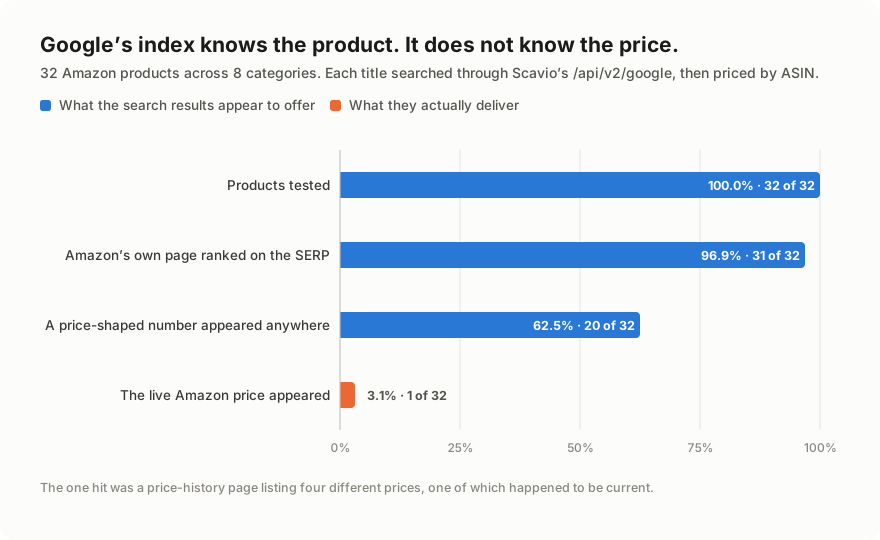
Amazon ranked on 31 of the 32 searches. The agent is not failing to find the product -- discovery works fine, and that is exactly what makes this hard to catch.
Then 20 of 32 searches put a price-shaped number somewhere in the organic snippets. To a model reading that page, the question looks answered. It is not: of those 20, exactly one carried the live Amazon price, and the median gap between the closest number on the page and the true price was 25%. The mean was 44%, and one product was off by 167%.
A note on how that was counted, because it flatters the SERP rather than us: "a price appeared" means any dollar amount anywhere in a title or snippet. That is deliberately generous, and it is also precisely what a language model reading the same page has to work with. It has no way to know whose price it is either.
The single hit deserves its own sentence, because it is not the win it looks like. It came from camelcamelcamel, a price-history site, and the snippet read:
Cosori TurboBlaze Air Fryer, 9-in-1, 6 Qt, PFAS-Free Ceramic Coating, New Price $83.80 3rd Party Used Price as of Aug 29, 2026. Amazon $85.36 01, 2025) $89.99
Four dollar figures, one date fragment, no labels a parser can trust. The live price is in there. So are three others.
Every price on the page belongs to somebody else
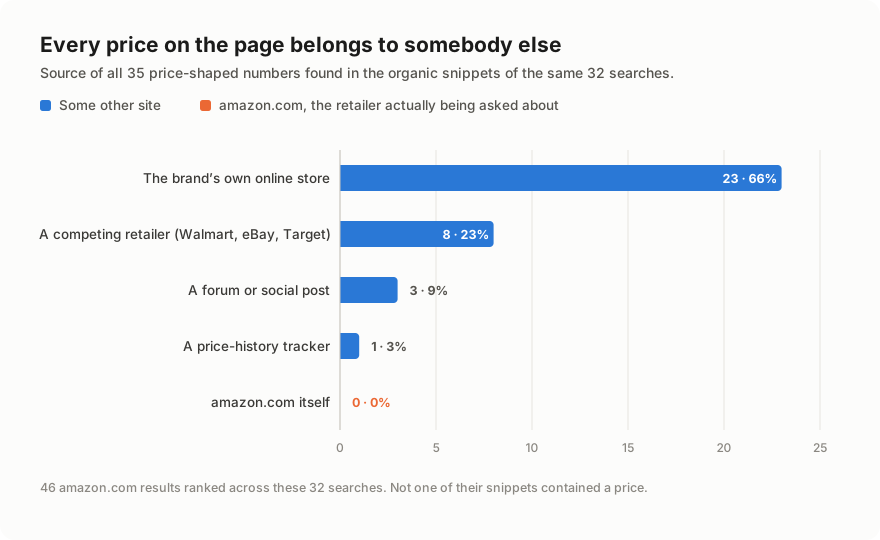
This is the mechanism, and it is cleaner than expected. Of the 35 price-shaped numbers found across all 32 searches, zero came from Amazon. They came from the brand's direct-to-consumer store, from a competing retailer, from a forum post, and once from a price tracker.
Some worked examples, all from the captured responses:
- A Ninja air fryer live at $89.99 on Amazon. The SERP offered Target's listing:
reg $129.99 ; Sale save $40.00 (31% off). Correct for Target, 44% high for Amazon. - A NutriChef air fryer live at $79.99. The SERP offered the manufacturer's own store:
Current price $99.99. The word "current" is doing a lot of damage there. - A Keurig coffee maker live at $149.99. The SERP offered
Coffee starting at $14.99 per box of 20-24ct. That is the price of pods.
An agent cannot distinguish these. Every one is a real price, correctly extracted, attached to the right brand, on a reputable domain. They are simply answers to a different question.
The reason the index cannot help is structural. 20 of the 32 products were discounted off list at the moment of capture, with a median discount of 24.7%. The discount is the entire live-only part of the number, and it is the part a stored snippet is guaranteed to miss.
The AI Overview does not rescue it
An AI Overview appeared on 12 of the 32 searches. Ten contained a price-shaped number, and one contained the live price. Several answered with a range -- $35 to $55, $31 to $48 -- which is the worst possible output for this job, because it is confident, plausible, and cannot be checked against a specific ASIN.
Stock is worse than price
Only 4 of the 32 searches mentioned stock state anywhere in their snippets. Meanwhile the live product data showed two items down to Only 9 left in stock - order soon. and Only 4 left in stock - order soon. For a product research or repricing agent, that is the field that decides whether the rest of the answer matters, and the index does not carry it.
So the routing debate is the wrong debate
The common fix is to give the agent a second tool that fetches and renders a known URL, then write a tool description sharp enough that the model reliably picks it. That works, and if you are already rendering pages, keep doing it.
But look at what it costs. You now maintain a browser or a rendering service, you handle the retailer's bot mitigation, you parse a price out of a layout that is not a contract, and you still rely on the model choosing correctly every time. When it chooses wrong, nothing throws -- it returns a real-looking number from a competing retailer, and the error travels quietly into whatever you built on top.
For a known retailer and a known product, there is no reason for any of that to be the agent's problem. Resolve to an identifier, then ask for the fields.
import os
import httpx

BASE = "https://api.scavio.dev"
HEADERS = {"Authorization": f"Bearer {os.environ['SCAVIO_API_KEY']}"}

# 1. discovery: keyword -> ASIN
hits = httpx.post(f"{BASE}/api/v1/amazon/search",
                  headers=HEADERS,
                  json={"query": "ninja air fryer pro 5qt", "country": "us"},
                  timeout=60).json()
asin = hits["data"]["products"][0]["asin"]

# 2. the live fields, as fields
p = httpx.post(f"{BASE}/api/v1/amazon/product",
               headers=HEADERS,
               json={"asin": asin, "country": "us"},
               timeout=60).json()["data"]

print(p["price"], p["list_price"], p["availability"], p["has_buy_box"])
That returns the real response below -- 1 credit, no rendering step, no snippet to interpret:
{
  "asin": "B0CSZ7WBYW",
  "title": "Ninja Air Fryer Pro, 5 Qt, 4-in-1, Grey, AF141",
  "brand": "Ninja",
  "price": 89.99,
  "list_price": 129.99,
  "currency": "USD",
  "availability": "In Stock",
  "rating": 4.7,
  "reviews_count": 8465,
  "is_prime": true,
  "has_buy_box": true,
  "sold_by": "Amazon.com",
  "sales_volume": "10K+ bought in past month"
}
has_buy_box and sold_by matter more than they look. A price is only meaningful next to who is selling at it, and when you need the rest of the sellers, /api/v1/amazon/offers returns them with is_buy_box_winner, discount_percentage and shipping already computed.
In an agent, that becomes one tool with no routing question attached, because it cannot be used for discovery and the model cannot misapply it. Search stays in the graph for what search is good at -- finding the product. It just stops being asked for a number it has never had.
What this does not show
Worth stating plainly. This tested 32 products in one country on a single day, so treat the exact percentages as an order of magnitude, not a constant. It did not test a rendering fetch tool, which does read the live page correctly -- the argument here is about what it costs to own, not whether it works. And the price extraction counted any dollar amount as a price, which if anything overstates how useful these snippets are.
Nor is our own layer magic. A product endpoint is a live call against a retailer that does not want to be read, so it can fail, and when it does you get an error rather than a confident wrong number. That is the trade being made: a loud failure instead of a quiet one.
Common questions
Why is Amazon not showing the price in Google search results? Amazon's price is rendered client-side and changes constantly, so it is not part of the indexed snippet Google stores. Across the 32 products tested here, 46 amazon.com results ranked and not one of their snippets contained a dollar figure. The title, the features and even the word "Deal" show up; the number never does.
Does adding a fetch or render tool fix the problem? Partly. A rendering fetch such as a headless browser will read the price off the live page, so the value it returns is real. What it does not fix is the routing: the model still has to decide to call it, and it still has to survive the retailer's layout changes and bot handling. Rendering trades a correctness problem for a maintenance problem.
Should I let the model decide when to fetch, or force it? Force it whenever the answer depends on a live field like price or stock. Tool descriptions do improve routing, but they make it likely rather than certain, and the failure is silent because a wrong price looks exactly like a right one. Better still, for a known retailer, remove the decision by calling a typed product endpoint instead of searching at all.
How do I get the current Amazon price for an ASIN?
Call Scavio's /api/v1/amazon/product with the ASIN. It returns price, list_price, currency, availability, has_buy_box and sold_by as typed fields, so there is no snippet to parse and no judgement call about which number on the page is the real one. It costs 1 credit.
Does Google's AI Overview show the current price? Rarely. An AI Overview appeared on 12 of the 32 searches, 10 of those contained a price-shaped number, and one contained the live price. Several returned ranges such as $35 to $55, which read as authoritative but do not identify what a specific ASIN costs right now.
How to identify stale data in an agent pipeline? Make the freshness explicit rather than inferred. Fail closed when a required live field is missing instead of letting the model narrate around the gap, and record which tool produced each field. The dangerous case is not the empty field, it is the confident wrong number, which no downstream check catches unless you know the source.
Does this apply to retailers other than Amazon? The mechanism does. Every price-shaped number found in these searches came from a brand's own store, a competing retailer, a forum post or a price-history tracker, which means the same snippet will misprice Walmart or Target for exactly the same reason. Scavio exposes Walmart, Target, eBay and Home Depot as separate product endpoints for that reason.
Can search results tell me whether an item is in stock? Almost never. Only 4 of the 32 searches mentioned stock state at all in their organic snippets. Two products in the sample were down to single-digit inventory, a fact that appears on the live listing and nowhere in the index.
How much does it cost to check prices this way? One credit per product lookup. Scavio's Project plan is $30/month for 7,000 credits, about $0.0043 each, so refreshing 200 ASINs every day is roughly 6,000 credits and fits inside that plan. The free tier is 50 credits with no card.
The part you would otherwise own
If you solve this yourself, here is the actual list. A rendering service kept alive for retail pages. Bot mitigation on a site that gets more hostile the more useful you find it. A price parser that is correct until the layout moves, with no test that catches the day it moves. A routing rule between search and fetch that is right most of the time. And, underneath all of it, the judgement call this post is about -- deciding which of the four dollar figures on a page is the one you meant.
Scavio absorbs that part. Page handling and layout drift happen on our side, and when Amazon changes something it is our on-call rather than your Saturday. What you get back is price, list_price, availability, has_buy_box and sold_by as typed fields, from one call that cannot be routed wrong.
One credit per lookup. On the $30/month Project plan that is 7,000 credits at about $0.0043 each, so a research agent refreshing 200 ASINs daily runs about 6,000 credits a month and stays inside it. No monthly commitment beyond the plan you pick.
Start with 50 free credits, no card -- enough to price all 32 products above and check every number in this post yourself.
Reference: the Amazon product data endpoints and the best Amazon product data APIs comparison.
Frequently asked questions
Why is Amazon not showing the price in Google search results?
Amazon's price is rendered client-side and changes constantly, so it is not part of the indexed snippet Google stores. Across the 32 products tested here, 46 amazon.com results ranked and not one of their snippets contained a dollar figure. The title, the features and even the word "Deal" show up; the number never does.
Does adding a fetch or render tool fix the problem?
Partly. A rendering fetch such as a headless browser will read the price off the live page, so the value it returns is real. What it does not fix is the routing: the model still has to decide to call it, and it still has to survive the retailer's layout changes and bot handling. Rendering trades a correctness problem for a maintenance problem.
Should I let the model decide when to fetch, or force it?
Force it whenever the answer depends on a live field like price or stock. Tool descriptions do improve routing, but they make it likely rather than certain, and the failure is silent because a wrong price looks exactly like a right one. Better still, for a known retailer, remove the decision by calling a typed product endpoint instead of searching at all.
How do I get the current Amazon price for an ASIN?
Call Scavio's /api/v1/amazon/product with the ASIN. It returns price, list_price, currency, availability, has_buy_box and sold_by as typed fields, so there is no snippet to parse and no judgement call about which number on the page is the real one. It costs 1 credit.
Does Google's AI Overview show the current price?
Rarely. An AI Overview appeared on 12 of the 32 searches, 10 of those contained a price-shaped number, and one contained the live price. Several returned ranges such as $35 to $55, which read as authoritative but do not identify what a specific ASIN costs right now.
How to identify stale data in an agent pipeline?
Make the freshness explicit rather than inferred. Fail closed when a required live field is missing instead of letting the model narrate around the gap, and record which tool produced each field. The dangerous case is not the empty field, it is the confident wrong number, which no downstream check catches unless you know the source.
Does this apply to retailers other than Amazon?
The mechanism does. Every price-shaped number found in these searches came from a brand's own store, a competing retailer, a forum post or a price-history tracker, which means the same snippet will misprice Walmart or Target for exactly the same reason. Scavio exposes Walmart, Target, eBay and Home Depot as separate product endpoints for that reason.
Can search results tell me whether an item is in stock?
Almost never. Only 4 of the 32 searches mentioned stock state at all in their organic snippets. Two products in the sample were down to single-digit inventory, a fact that appears on the live listing and nowhere in the index.
How much does it cost to check prices this way?
One credit per product lookup. Scavio's Project plan is $30/month for 7,000 credits, about $0.0043 each, so refreshing 200 ASINs every day is roughly 6,000 credits and fits inside that plan. The free tier is 50 credits with no card.